Pet Workshop
Write a description or upload character art
Create your own look, then bring it to life
 MoeGuardMoeGuard
A customizable Windows desktop petOpen-source, auditable clientFree trial credits for one complete pet ✦
Drop in some character art, or write a little description
MoeGuard turns it into a pet to play with, customize, and keep watch
A little companion, right at home on your screen (。•̀ᴗ-)✧
The app interface is currently in Simplified Chinese
Free download · Windows 10/11 64-bit · About 200 MB
The first row has MoeGuard’s built-in pets. Tap to switch!
The next two rows are fan-made demos. Select one to download a pack and import it into MoeGuard
Play, customize, keep watch—more than just a cute face
Write a description or upload character art
Create your own look, then bring it to life
Lumen, Poppy, and Rook are ready to meet you
Tap, pick them up, or let them peek from an edge
Add animations or try a new look
Your earlier versions are kept safe
See generation progress and estimated wait times
Step away—we’ll let you know when it’s ready
Export a character as a folder
Import it on another PC, just as it was
With your permission, keep watch while your PC is locked
Camera footage and evidence stay on your PC
Questions? Just ask MoeGuard 💬
Hi there, I’m MoeGuard!

Tap a question below and I’ll show you around
Tap the pink button to download the installer!
Windows may show a warning the first time you open it
If your browser flags the download, choose “Keep”
In the blue SmartScreen window, choose “More info” → “Run anyway”
I’ll make myself at home on your desktop
Give me a tap, or drag me somewhere new
Drag me to the edge of the screen and I’ll peek out!
Right-click me to open “桌宠工坊… (Pet Workshop)” or “设置 (Settings)”
Leave it to me (•̀ᴗ•́)و

In “桌宠工坊… (Pet Workshop)”, write a description or upload character art
With a description, I’ll draw two options for you to choose from
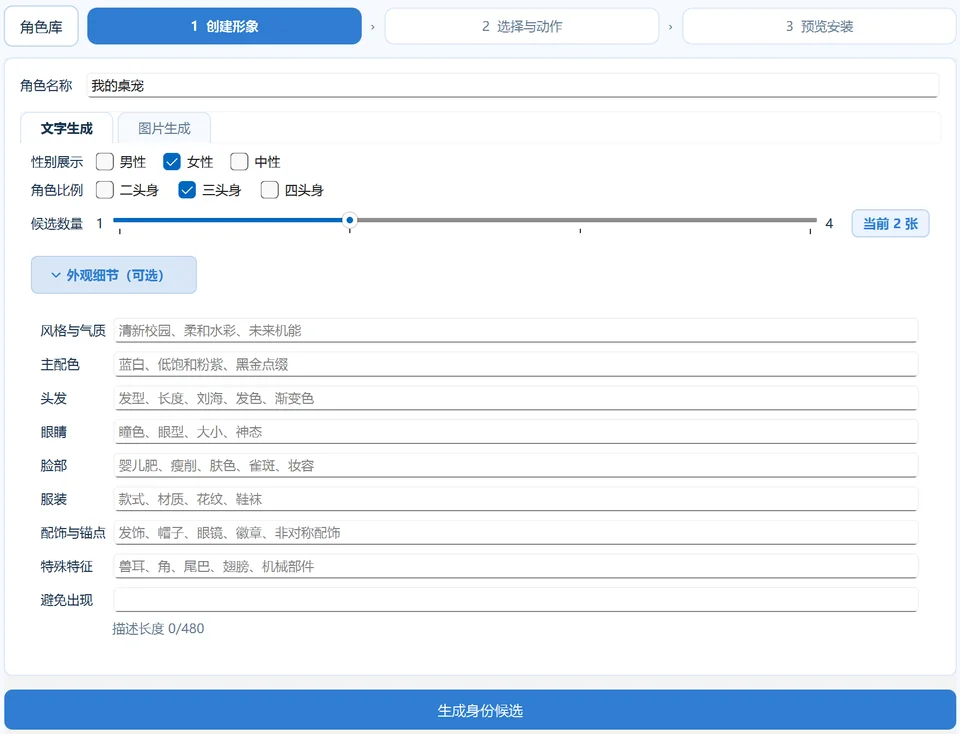
Pick your favorite, then select the animations you want
Each animation takes about two or three minutes. I’ll let you know when it’s ready!
Your new-user trial credits cover one complete pet with all animations
First, unzip the character pack to get a folder
Right-click me → “设置 (Settings)” → “通用 (General)”
In the “角色管理 (Roles)” row, click “导入角色… (Import role…)”
Choose the folder that directly contains role.json. That’s it!
This also works for characters exported with “保存并导出至… (Save and export to…)” in the workshop
Importing costs no credits, and you can move your pet to another PC unchanged
Try selecting a fan-made character above to download its pack!

When you lock your PC and step away, with your permission,
I can use the camera to help keep watch
The footage stays on your PC
Rather leave it off? That’s fine—keeping you company is enough for me ฅ( ̳• ·̫ • ̳ฅ)
More features and ways to play are in the works. Stay tuned!
A few things you might be wondering
MoeGuard itself is free: the download, three built-in pets, and watchkeeping are all free to use
Pet Workshop generation runs in the cloud, with separate credits for character art and animations
On first launch, new users receive trial credits: 4 character-art generations + 8 animation generations, enough for one complete pet
Trial credits are issued in batches. Once used up, you can top up with redemption codes obtained on Afdian
Occasional free-credit offers also appear on Afdian. Follow along!
The MoeGuard client is fully open source (Apache-2.0), with all its code on GitHub for anyone to inspect
There’s no purchased code-signing certificate yet, so Windows doesn’t recognize the app
That SmartScreen warning doesn’t mean a virus was detected. Choose “More info” → “Run anyway”
Only use installer links from this page, GitHub, or MoeGuard’s Afdian posts
No email or phone number needed. An anonymous account is created on first launch
Text and images uploaded to make pets are used only for generation and cleaned up on the server in batches
There are also limited anonymous usage statistics, excluding prompts, images, and character names
The camera only runs when you enable watchkeeping. Footage and evidence stay on your PC
Your own OCs, commissioned art, or character art you have permission to use
A single character, full-body or half-body, with a simple background works best
Please only upload images you have the right to use
About two or three minutes per animation. Check the workshop’s estimate for your task
No need to sit and wait. Step away and MoeGuard will let you know when it’s ready
No need to come back and download it again!
MoeGuard notifies you of new versions, then installs and restarts after you confirm
Your characters, settings, and remaining credits are kept
Currently Windows 10/11 64-bit only. Phones and Macs aren’t supported yet
An ordinary office PC is fine. Generation runs in the cloud, so you don’t need a powerful GPU
Five quick questions, about a minute
Already installed? Add your support ID to receive a reward
From the first version to today, one step at a time
Drop by for the latest updates!
NEW
Better character-art and action generation, with faster results
Cancellation keeps candidates, installation stays responsive, and each character remembers its FPS
Better window restoration, action scale and transparent previews; fix growing idle memory use on Windows
Service connection and credits now refresh automatically, with clearer notices when credits run low
Your support ID now stays the same after upgrading
Fixes duplicate anonymous accounts when MoeGuard is opened several times on first launch
One instance runs per user data folder, and reconnects and credential renewals keep your original identity
A playable demo, nine characters, a getting-started guide, and a reward survey—all in one place
Plus inbox notifications, character renaming, and other small improvements
The installed app can now update in place—no fresh download needed
Added an inbox and support ID, plus the current version in settings
Pet Workshop makes its desktop debut
Generation progress, wait estimates, completion alerts, and character export and import
Pet Workshop reached its first users. Read the Afdian beta announcement
Watch the full text-to-pet and image-to-pet workflows
Three starter pets, desktop interactions, and watchkeeping while locked make their debut
Updates, new ways to play, and redemption-code offers live here
